Gear Dear Font Review
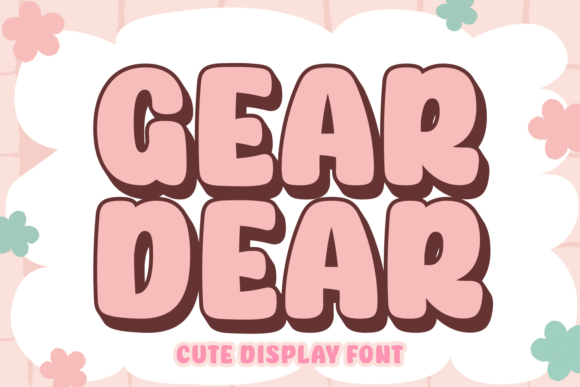
As a marketing designer, I’ve found that the right font can make or break a campaign’s visual identity. When I first came across Gear Dear, it felt like discovering a hidden gem in the world of Display Fonts. This quirky typeface, with its 70s and 80s retro flair, has quickly become a staple in my creative toolkit. Whether I’m working on a seasonal sale graphic or a YouTube thumbnail, Gear Dear adds a playful energy that stands out in a crowded digital space.
Gear Dear for Social Media Graphics and Instagram Posts
Using Gear Dear in social media graphics is like adding a splash of color to a monochrome canvas. It works especially well for Instagram posts that aim to capture attention in a fast-scrolling feed. The bouncy letterforms bring a sense of movement and fun, making it ideal for promotional content, product teasers, or even motivational quote graphics. When paired with bold colors and dynamic layouts, Gear Dear becomes the visual anchor of the design, drawing the eye and reinforcing the brand’s personality.
One of the key benefits of Gear Dear is how it performs on mobile screens. Its large x-height and open counters ensure legibility even at smaller sizes, which is crucial for thumbnails and preview images. I’ve used it successfully in Instagram story overlays and reel covers, where clarity and impact are essential. Just be mindful of not overusing it—too much text in this font can feel overwhelming, especially on dark backgrounds.
Best Practices for Mobile-First Design
- Use Gear Dear for headlines, callouts, or short phrases only.
- Avoid using it for long paragraphs or dense information.
- Pair it with a clean sans serif for contrast and readability.
Gear Dear for YouTube Thumbnails and Digital Ads
When designing YouTube thumbnails, the goal is to create an instant connection with the viewer. Gear Dear excels here because of its nostalgic appeal and high visual impact. It gives the thumbnail a retro vibe that resonates with audiences who appreciate vintage aesthetics. I’ve used it for video titles in a series about 80s pop culture, and the result was both eye-catching and thematically consistent.
In digital ads, Gear Dear helps differentiate the message from the noise. It’s perfect for ad copy that needs to stand out without being too loud. For example, in a campaign promoting a limited-time offer, using Gear Dear for the headline can add a sense of urgency and excitement. However, it’s important to test different weights and styles to find the right balance between creativity and professionalism.
Gear Dear for Brand Campaigns and Promotional Visuals
For brand campaigns, consistency is key. Gear Dear offers a unique voice that can help establish a distinct brand identity, especially for businesses targeting younger, trend-conscious audiences. I’ve used it in a series of promotional visuals for a boutique online shop that sells retro-inspired merchandise. The font’s playful nature aligned perfectly with the brand’s aesthetic, creating a cohesive look across all touchpoints.
It also works well in branded template packs, where it can be used for headers, banners, and promotional elements. However, I recommend using it sparingly in these cases. Overuse can dilute its impact, so it’s best reserved for high-impact areas like main headlines or logo-style text.
Font Pairing Tips for Professional Results
- Combine Gear Dear with a modern sans serif for a balanced look.
- Use it alongside a script font for a more personalized feel.
- Avoid pairing it with other decorative fonts that might clash.
Gear Dear for Web Design and Email Banners
Web designers often face the challenge of balancing style with usability. Gear Dear can be a great asset in this context, especially for website headers, landing page titles, and email banners. Its bold, expressive character makes it ideal for attention-grabbing headlines, while its retro charm adds a layer of storytelling to the design.
In email marketing, Gear Dear can elevate the visual appeal of a newsletter or promotional email. I’ve used it in subject lines and header sections to create a sense of fun and approachability. That said, it’s important to ensure that the font is web-safe or properly embedded, as some email clients may not support custom fonts.